
01 · Cameras and access control
Cameras are evidence. Design them for what you need to prove.
A camera system is only worth having if the footage answers the question when you need it. We design backwards from that question: where, how clearly, for how long, and who can reach it.
Flat-rate quote · No monthly fees you did not expect
Sample camera schedule
Front entrance
250 px/m at the door
Identify
Receiving dock
125 px/m at the side door
Recognize
Parking lot
62 px/m across the lot
Observe
Back fence line
25 px/m along the fence
Detect
Illustration, not a real plan
Four levels of detail, and each needs a different camera
The video-surveillance standard, IEC 62676-4, defines what a camera must show by how many pixels land on each meter of the subject. The camera that detects a person in the lot cannot identify them.

1
Detect
25 px/m
Is anyone there?

2
Observe
62 px/m
How many people, and what are they wearing?

3
Recognize
125 px/m
Is this the person we saw earlier?

4
Identify
250 px/m
Who, exactly, is it?
Source: Axis, Pixel density and DORI. Pixels per meter are measured at the subject.
Where we aim for each level
Identify
Entry doors and registers
Recognize
Receiving docks and side doors
Observe
Parking lots and yards (plates need their own angle)
Observe
Interior sight-lines between entrances
Detect
Fences and open perimeter
03 · How many cameras, and where
We mark the cameras on a plan, then quote exactly that.
Planning starts with what you would need to prove or prevent, not with a camera count.
- Every entry and exit
- Registers and cash handling
- Receiving doors and dumpster corners
- The lot where vehicles sleep
- The interior sight-lines that connect them
A small office can often be covered with a handful of well-placed cameras. A contractor’s yard or a retail floor needs more, placed so faces and plates land at usable angles instead of atmospheric wide shots. No camera padding, no coverage theater.
Analytics run on the camera. On compatible AXIS models, object analytics detects people and vehicles and handles line crossing, loitering, counting and occupancy, so you get useful alerts without buying a server. It comes preinstalled at no extra cost. About AXIS Object Analytics
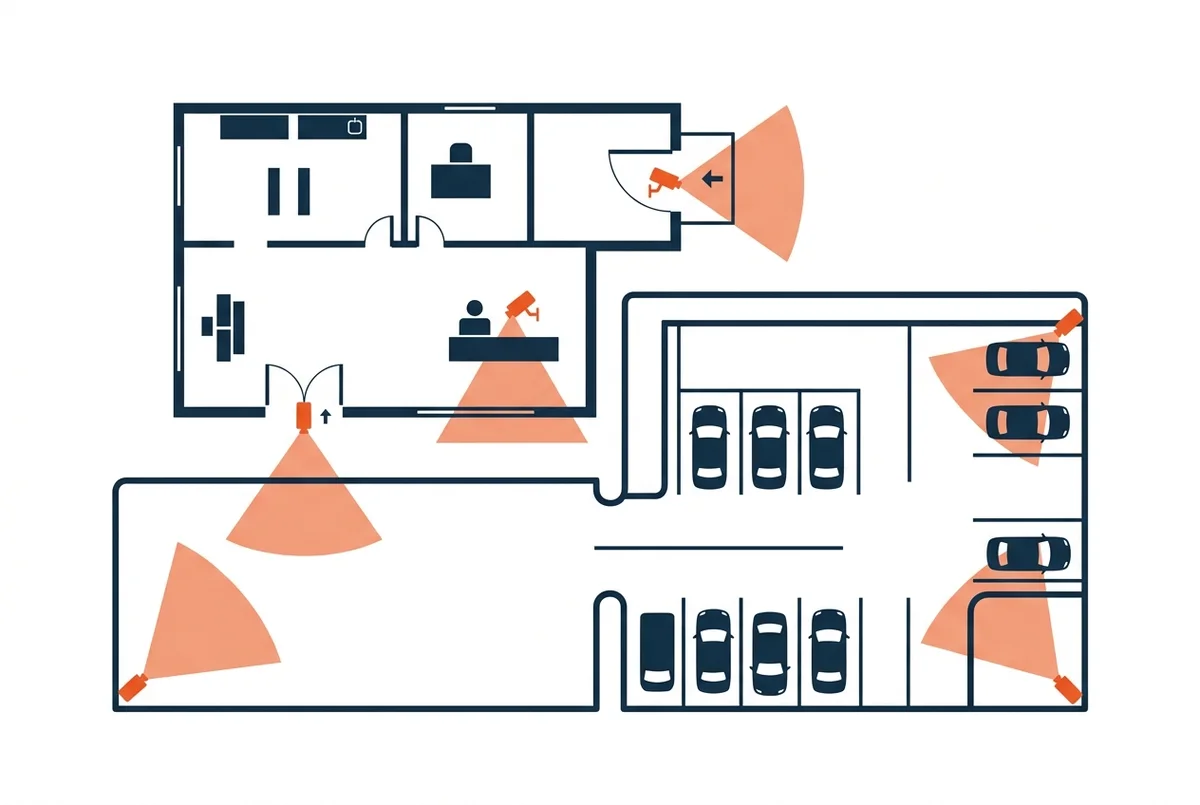
Illustration: a typical small-business plan
04 · Retention
How long you keep footage is arithmetic.
One megabit per second, recorded nonstop, is about 10.8 GB a day. Multiply by your cameras and the days you want to keep, and you know what to buy before you buy it.
Local recording on an NVR avoids endless monthly cloud fees. Optional cloud copies protect the critical views if a recorder is ever stolen.
Smart compression helps too. Axis says its Zipstream technology cuts storage by 50% or more while keeping faces and plates sharp. That is a vendor figure and it varies with the scene, so we size on the cautious side. About Zipstream
30 days, 4 Mbps per camera, recording nonstop
Illustrative. Motion-based recording and lower bitrates cut this. We size from your real cameras, add about 15% headroom, and use drives rated for 24/7 writing. Retention calculator
Keys you can’t lose
Credentials differ more than they look. This is the ladder we climb with every door.
Metal keys
Get copied, lost and carried off by former employees, and rekeying a building is expensive.
No audit trail
Basic proximity cards
The common 125 kHz cards send their number in the clear, so they can be cloned with inexpensive tools.
Cloneable
Encrypted smart cards on OSDP readers
The reader and controller talk over an encrypted channel, and the card itself is protected. Cards can be disabled the moment one goes missing.
Encrypted
Phone credentials
No card to issue or lose. Access is granted and revoked in seconds, with a log of who opened which door, when.
Revoke in seconds
On the hardware side we use OSDP-verified AXIS door controllers, such as the A1001 and the A1601, which supports up to four readers. Schedules, visitor access and after-hours alerts are all part of the design conversation. Our founder deployed AXIS camera and access-control systems in enterprise environments, and we bring that experience to offices, shops and warehouses.
A note on fingerprint and face readers in Illinois
Illinois’ Biometric Information Privacy Act requires a written release before you collect fingerprints or face scans from employees. A 2024 amendment limited damages, but the consent requirement remains. We default to cards and phones, and install biometrics only when you want them and the paperwork is in place. This is general information, not legal advice. About the 2024 change
Cameras are computers. Install them like it.
A badly installed camera is a hole in your network. Because we design the network and the cameras together, there is one accountable answer when something needs attention.

On its own network zone
Cameras and door controllers land on a segmented network that staff computers and guests cannot reach, as in our network design.
No default passwords, no open ports
Default credentials and cameras exposed to the internet are how devices get recruited into botnets. Remote viewing goes through secure apps, not holes in the firewall.

Hardware with a clean supply chain
The FCC stopped authorizing new Hikvision and Dahua equipment in 2022, and federal contractors cannot use it. We install professional lines such as AXIS, which states its entire portfolio is Section 889 compliant and uses no chips from the banned companies, and Alibi, whose Vigilant range is sold as NDAA compliant. Axis statement · Where Hikvision and Dahua are banned

Audio off unless you need it
In Illinois, covertly recording private conversations needs everyone’s consent, and video-only cameras sit outside that rule. We switch microphones off by default and keep cameras out of restrooms and locker rooms.
The first time anyone checks should not be the day you need the footage
Our installations include a simple health-check routine, and clients on support plans have it handled as part of the plan.

Lenses focused and clean
Cameras drift out of focus and collect dust and spider webs.

Storage not silently full
Disks fill, and the recorder quietly stops keeping what you think it keeps.

Firmware up to date
Updates close the holes attackers actually use.

Retention confirmed
We pull a real clip from the oldest day you should have.
Professional gear is built to be maintained. AXIS, for example, includes a five-year hardware warranty and offers long-term-support software tracks that get security fixes for about five years, which is the opposite of a camera with endless monthly fees. Some insurers also ask about cameras and access control on commercial policies, and a documented, maintained system can help at renewal. Axis warranty · AXIS OS support tracks
08 · Free walk-through
Twenty minutes on your property tells you more than a brochure.
We walk it with you, mark camera positions on a plan, and give you a flat-rate quote for exactly that.
- Where the real vulnerabilities are
- The detail level each spot needs
- What a right-sized system honestly costs
Sample walk-through notes
Front entrance
Needs a face-level view
Add camera
Loading dock
Side door not covered
Cover
Recorder
Disks nearly full
Expand
Parking lot
Covered at observe level
OK
Illustration with made-up results
FAQ
Cameras & Access Control: common questions
Do camera systems require a monthly fee?
Not with local NVR recording — footage stays on your equipment with no subscription. Optional cloud copies or remote monitoring add fees only if you want them. We’ll show you both models and let the math decide.
How long is video footage kept?
As long as your storage allows — we size the recorder to your retention goal, commonly 30 to 90 days, longer for critical views. You choose the target; we spec the drives.
Can I see my cameras from my phone?
Yes — secure apps for phone and desktop show live views and recorded clips, with per-user permissions so managers see what they should and nobody sees what they shouldn’t.
How long should we keep footage?
Thirty days is a common starting point. The right number depends on how quickly you would notice an incident, and storage is sized to whatever you choose, so it is a business decision, not a technical limit.
Can we use fingerprint or face readers on our doors?
Yes, but in Illinois you need written consent from each person before collecting biometrics. Most small businesses are better served by encrypted cards or phone credentials, which are easy to revoke and carry no biometric obligations.
Service area
Cameras & Access Control across our region
We deliver this service on-site and remotely throughout McHenry County, the NW suburbs, and SE Wisconsin.
Related services
Businesses often pair this with
Network Design, Setup & Support
Business networks built on Cisco, HPE/Aruba, and Ubiquiti — designed, secured, and supported by a local…
Structured Cabling
Clean, certified low-voltage cabling for offices, warehouses, and new builds — the foundation everything else runs…

Cybersecurity
Layered protection against ransomware and phishing: MFA, endpoint security, email defense, and backups you can restore…
Managed IT Services
Flat-rate IT support and proactive management that keeps your whole business running, so you stop firefighting…
Ready to make your technology an advantage?
Free consultation, honest answers, no obligation.