
01 · Structured cabling
The wiring everything else depends on.
Intermittent drops, slow links and devices that will not stay online are very often a cabling problem wearing a network costume. We install it neat, certified, labeled and documented, so it stops being the suspect.
Flat-rate quote after a walk-through
Sample certification report
Run B-07, front office
61 m, crosstalk in margin
Pass
Run B-12, conference room
88 m, in margin
Pass
Run C-03, back office
97 m, over the 90 m limit
Fail
Run C-09, warehouse
Failed at termination
Re-terminate
Illustration with made-up results
Every cable has a budget of 100 meters
Ethernet over twisted pair works within a fixed length. The standard splits it so the cable in your walls stays within 90 m and the patch cords at each end use the other 10 m.
Device
PC, phone, camera, access point
Cord
Wall outlet
Labeled, e.g. B-07
Permanent link
Up to 90 m (295 ft) through walls and ceiling
Patch panel
Port 1-07, same label
Cord
Switch
In the closet or rack
Whole channel: 100 m (328 ft) maximum, including up to 10 m of cords at both ends
We measure before we promise. A desk 100 m from the closet is not a long cable, it is a second closet or a fiber link, and we plan for that up front. About TIA-568
The right cable for each run
Faster is not always better, and thicker is not always necessary. We spec each run by what it will carry and how long it must last.
Cat6
At 1 Gbps
Full 100 m. Carries 2.5 and 5 Gbps multigig links too.
10 Gbps
Only about 37 to 55 m, depending on crosstalk.
PoE
Fine for most devices. More loss at the highest power levels.
Best for
Desk, phone and camera drops.

Cat6A
At 1 Gbps
Full 100 m, with headroom to spare.
10 Gbps
Full 100 m, the reason it exists.
PoE
Best for high-power PoE: 802.3bt supplies 60 to 100 W per port.
Best for
Access points, long runs, anywhere 10 Gbps is realistic. Thicker and costs more.

Fiber
Short reach
Multimode OM3 carries 10 Gbps to 300 m, OM4 to about 400 m.
Long reach
Single-mode OS2 goes 10 km or more, and keeps up as speeds rise.
PoE
None. Devices at the far end need their own power.
Best for
Between buildings and floors, and backbones you want to keep for a decade.
Access points deserve a note: Wi-Fi 6, 6E and 7 radios often need 2.5 or 5 Gbps uplinks, which run over 100 m of Cat5e or better. We size drops for the Wi-Fi you will have in five years, as we do in our network design.
A cable that lights up is not a cable that is certified
Three levels of testing, and only the last one is proof. We certify every run.
1
Verified
Are the wires in the right order?
A basic wire-map tester finds opens, shorts and swapped pairs. It cannot tell you if the cable will carry a fast link.
2
Qualified
Will it carry a particular speed?
A step up: checks that the link supports a given application today. It is not a measurement against the cabling standard.
3
Certified
Does it meet the standard, every run?
A certification analyzer measures length, crosstalk and margins against TIA-568 and produces a report per run, which you keep.
When something misbehaves years later, a certification report shows the wiring was tested and met the standard. It is also what leases, insurers, equipment warranties and future buyers of your business may ask to see.
Five questions to ask every cabling installer
The lowest bid is often low because of something on this list. Ask these of us too.
1
Is it solid copper, and is it listed?
Cheap “Cat6” can be copper-clad aluminum. It does not meet TIA-568, and it carries PoE poorly. We install solid copper, with plenum-rated (CMP) cable where the code requires it. Case study
2
Will you certify every run and hand me the report?
If the answer is “we tested them”, ask with what. A wire-map check is not certification.
3
Are both ends labeled, with as-built documentation?
Without labels, every future change starts with guessing which cable goes where.
4
What happens to the old cable?
The electrical code requires accessible abandoned communications cable to be removed, unless it is tagged for future use. We remove it or tag it. NEC summary
5
How long is each run, really?
Past 90 m of permanent link, copper stops being the right answer. Anyone who quotes it anyway is hoping it works.
The cheapest time to run cable is before the drywall
Bring us in during planning and we coordinate with your general contractor and electrician. Planning before the walls close is usually far cheaper than retrofitting afterward.
1
Plan
Place drops where desks, cameras and access points will actually live.
2
Rough-in
Pull cable while the walls are open. This is the cheap moment.
3
Drywall
The window closes. After this, every drop is a retrofit.
4
Trim-out and test
Terminate, label and certify every run.
5
Move in
Plug in. Nothing to chase.
What drives the price
Drop count
How many outlets, and where.
Ceiling type
An accessible drop ceiling costs a fraction of finished drywall.
Distance to the closet
Longer runs cost more, and past 90 m need a second closet or fiber.
Open walls or finished
Before drywall is the cheapest it will ever be.
We quote flat-rate after a walk-through, schedule around your busy hours, and tell you plainly when moving equipment closer to existing runs gets the same result for less.
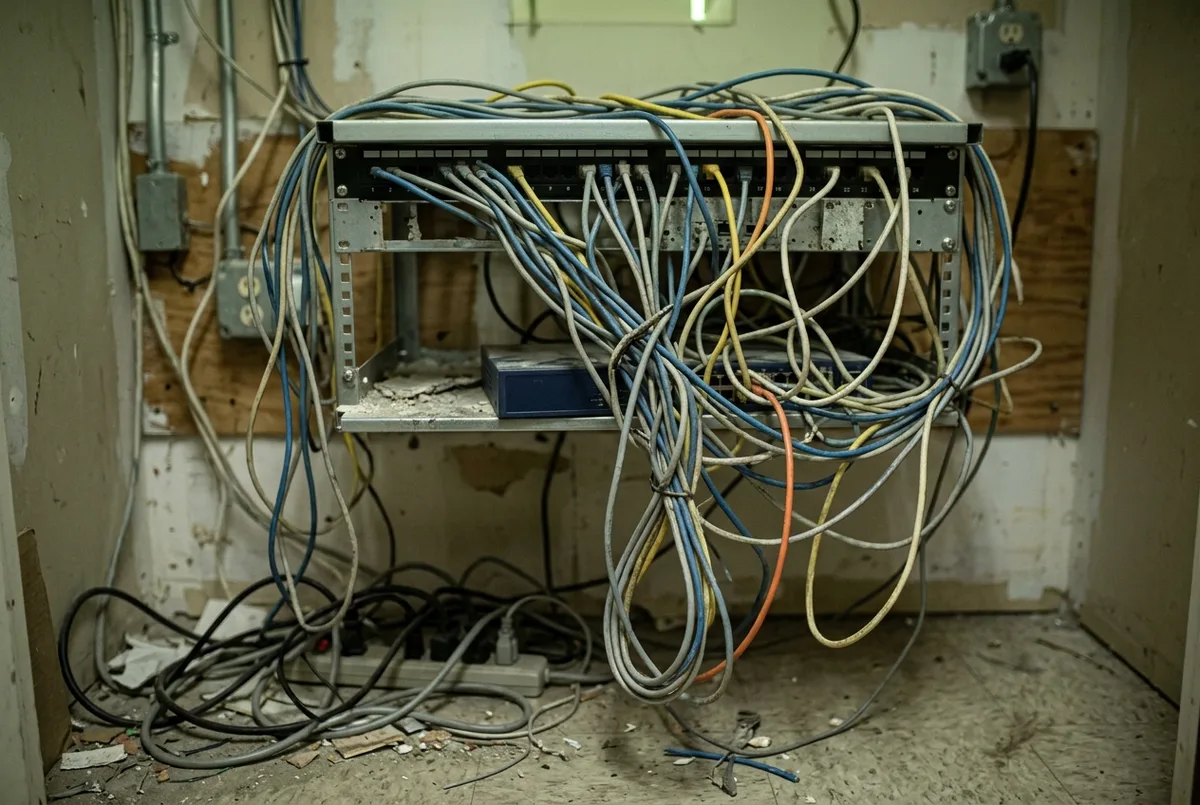
Inherited
After cleanup
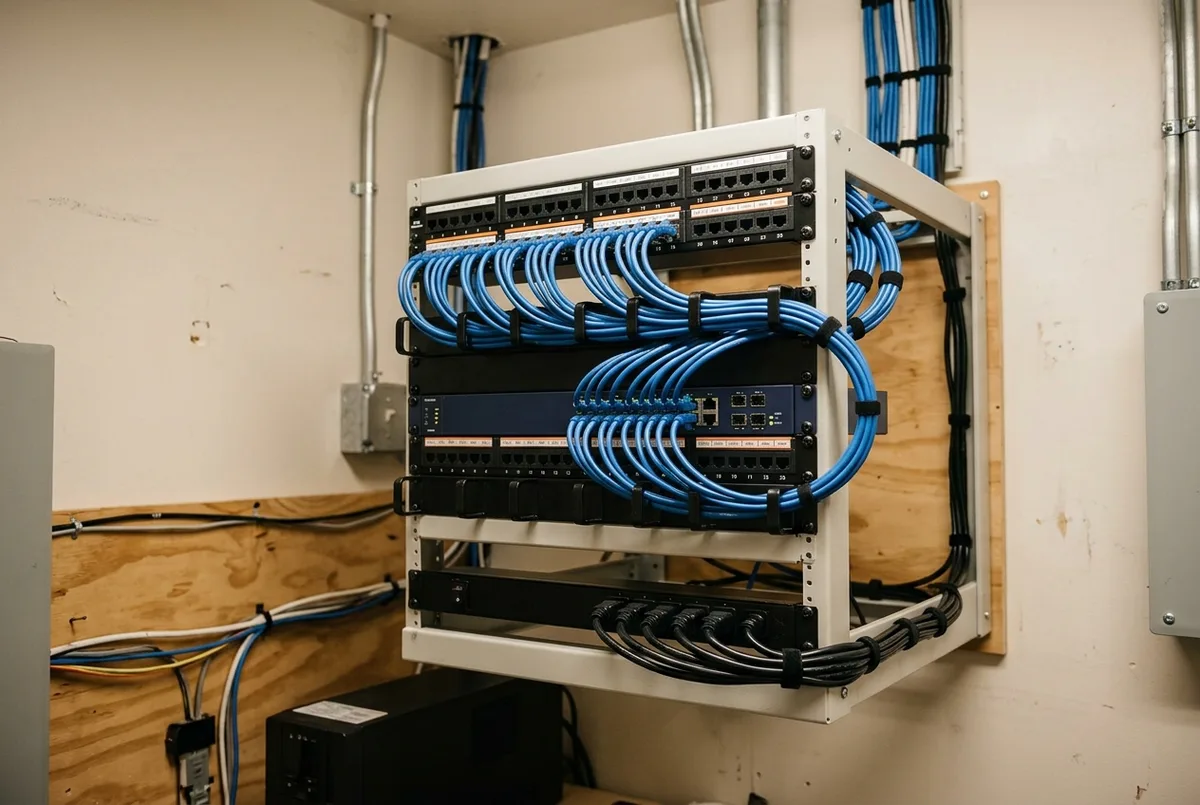
Illustration. A ceiling full of mystery wiring and a rat’s nest of a closet are the usual starting point.
07 · Documentation
A closet you can show off.
Everything is labeled, tested and drawn, so future changes are easy and troubleshooting is fast. If a ceiling full of mystery wiring came with your space, we trace it, keep what is good and remove what is not.
- As-built documentation: every drop, panel and path
- Certification results for every run, yours to keep
- Tidy patch panels and cable management that stay tidy
- Spare capacity where you are likely to grow
Same label at both ends
Wall plate
B-07
⇄
Patch panel
B-07
Unplug nothing to find out which cable it is. The standard for this, TIA-606, calls it cabling administration.
One accountable low-voltage partner
Electricians and IT companies each handle part of the job. We cover the gap, from blueprint to patch panel to the network on top.
The same discipline covers
Cameras
Wi-Fi access points
Access control
Conference-room AV
Fiber between buildings
Phones
The cable, the switch port and the device belong to one plan. See networking, cameras and access control and phones.
09 · Free walk-through
Walls open, or a closet you are embarrassed to show?
We walk the space, measure the runs and give you a flat-rate quote in plain language.
- Every run measured against the 90 m limit
- Cable type chosen for each job
- Certification and documentation included
Sample walk-through notes
Longest run to the closet
86 m, within the limit
OK
Patch panel
Unlabeled
Label
Cable above the ceiling
Abandoned, untagged
Remove or tag
Wi-Fi access point uplinks
Cat5e
Check speed
Illustration with made-up results
FAQ
Structured Cabling: common questions
Can you work with our contractor on a build-out?
For build-outs we coordinate directly with your GC and electrician, schedule around other trades, and handle low-voltage the way it should be done — planned on the blueprints, not improvised after drywall.
Cat6 or Cat6A — what should we install?
For most offices, Cat6 handles today and tomorrow affordably. Cat6A earns its premium for long runs, high-density Wi-Fi backhaul, and anywhere 10-gigabit is realistic. We’ll spec by need, not by margin.
Can you clean up our existing wiring instead of replacing it?
Often, yes. We trace and test what’s in place, re-terminate and label what’s salvageable, remove abandoned cable, and replace only what fails testing. You get a documented, organized closet without paying for a full re-pull.
Why is your quote higher than the cheapest bid?
Usually because of what the cheap bid leaves out: solid copper listed cable, certification of every run, labels and documentation, and removal of old cable. Ask the five questions above of every bidder and compare like with like.
Does old, unused cable have to come out?
The electrical code requires accessible abandoned communications cable to be removed unless it is tagged for future use. We trace what is there, keep what is useful, tag what you will need and remove the rest.
Service area
Structured Cabling across our region
We deliver this service on-site and remotely throughout McHenry County, the NW suburbs, and SE Wisconsin.
Related services
Businesses often pair this with
Network Design, Setup & Support
Business networks built on Cisco, HPE/Aruba, and Ubiquiti — designed, secured, and supported by a local…
Cameras & Access Control
Professional camera and door-access systems that protect your people and property — with remote viewing from…
Business Phone Systems & VoIP
Business phone systems and VoIP for McHenry County IL & SE Wisconsin, powered by 3CX, Yealink,…

Managed IT Services
Flat-rate IT support and proactive management that keeps your whole business running, so you stop firefighting…
Ready to make your technology an advantage?
Free consultation, honest answers, no obligation.